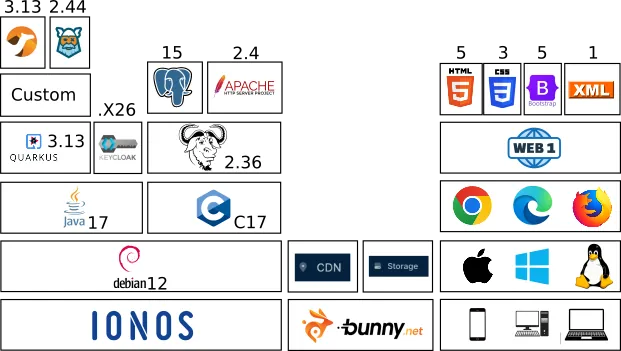
Technical-context architecture
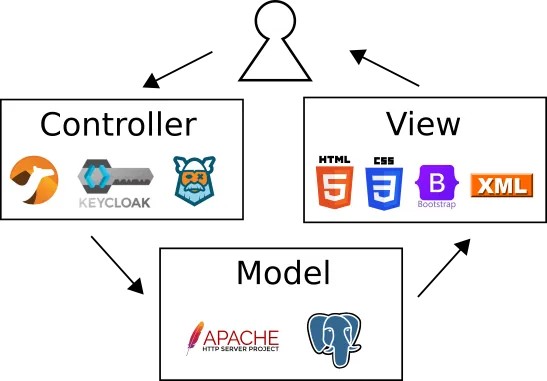
The general idea is to let the user send a request and receive a response. The response will include options for the user, such as links or forms, to decide the next request. Some responses may be directly accessed randomly, others may be required to be accessed in sequence (i. e. select the city only makes sense after selecting the region and the country first). The user is normally required to make small requests (called flat input), but he is able to receive a rich response (called nested output). Every request will pass through three layers, always in the same order: Controller, Model and View.
The Controller is where the business rules are processed. This is managed by an integration tool called Apache Camel. An integration tool is able to pipe the input to pass through several rules in a predefined order. Plus, an integration tool can also reorganize a nested input into flat chunks that can be processed by the rule engine. Normally the rules depend on the user being authenticated and having permission to do something, that's why we have Keycloak to manage the user identity. The rules themselves are processed by a rule engine called Kogito. Kogito supports BPMN and DMN standards. Custom rules can be implemented in Java or Groovy if needed, but normally this is not necessary.
The Model is where we guarantee data integrity and efficiency. After the business rules process the input, we are able to augment the request with relevant information. It is in this part that we can append objects such as images, spreadsheets and even softwares referred by an URL. We use the Apache HTTP to guarantee that the URL will delivery the same object consistently and to take advantage of caches, compression, and many other features. We can also add information from a relational database if chunks of data need to be consistent across many objects without requiring to manage the complexity of locks and transactions. We use PostgreSQL to take advantage of the relational model to store pieces of data without duplication and to build the information on the fly. Plus, we can also update the information from the long time memory at this layer.
The View is where the response will be built to be sent to the user. After processing the business rules and adding the relevant data, it's time to format the output in a way that makes sense to the user. This means that we have more freedom to arrange the information in any way we imagine. In order to make the response ready for an API and save network payload regarding static layout details, we format the server response in XML. In the case the user is human and not a robot, the XML will be hydrated again in the browser, making it presentable. This transformation is done with XSLT and XPath, which are part of XML. The final response is built with HTML, CSS and Bootstrap.